Lifestyle
·
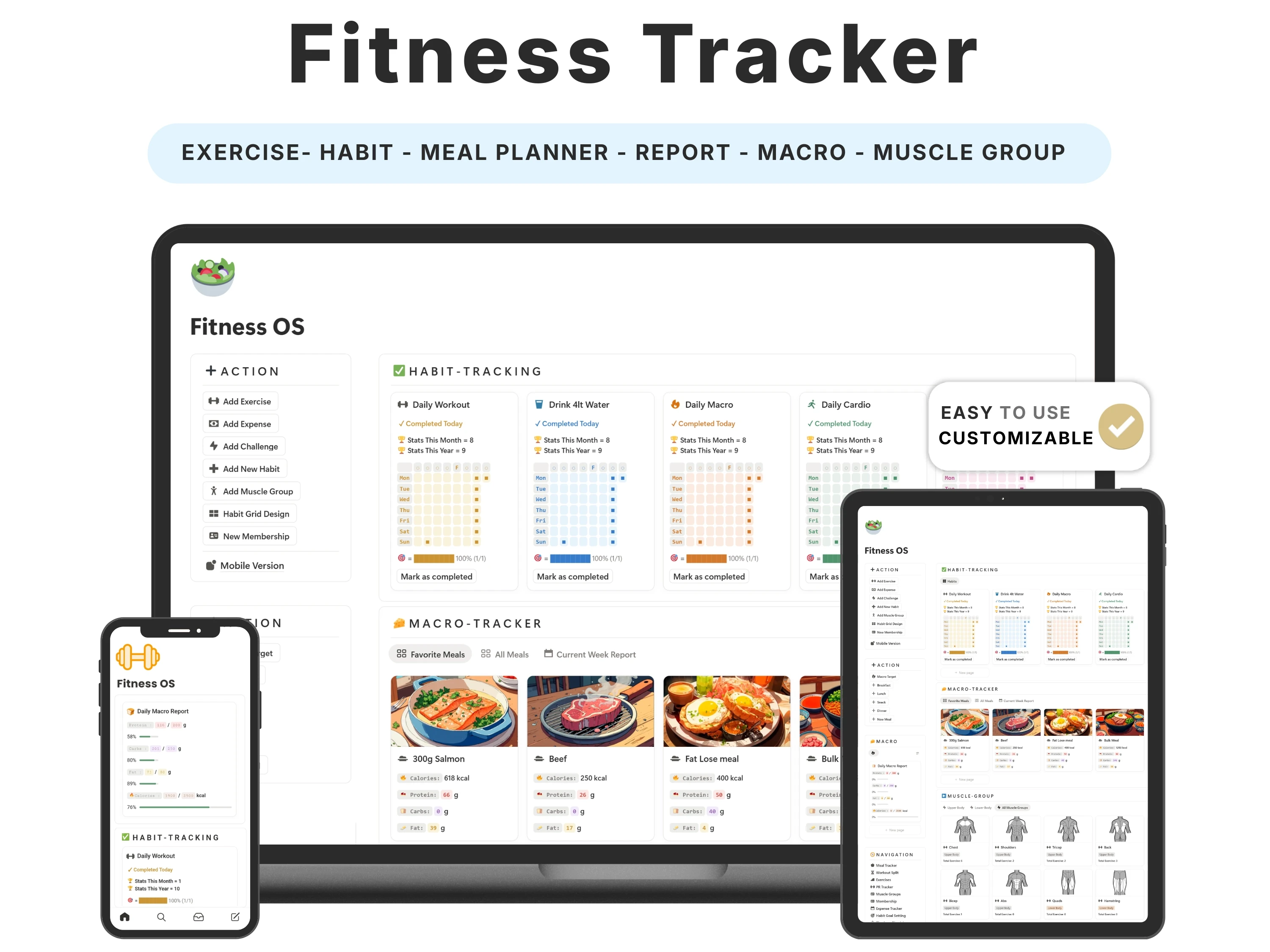
Fitness apps are loud. They ping you, upsell you, and bury your own data behind a paywall. A Notion fitness tracker template offers the opposite: a quiet, private place to log workouts, meals and progress against your own goals — and nothing else competing for your attention.
This guide covers what a complete fitness tracker needs in 2026, how to set one up before your next session, the tracking habits that actually drive progress, and how the Fitness Tracker for Notion brings training, nutrition and results into one view.
Quick answer: The best Notion fitness tracker template logs workouts, sets, meals, macros, weight and PRs against your own goals in one dashboard — with streaks and progress views, minus the ads and notifications. The Fitness Tracker by Organized Dashboard ($12, one-time) does exactly this on Notion’s free plan and is rated 5/5.
The problem with most notion fitness tracker templates
Progress in the gym is invisible without a record. ‘I think I’ve been going a lot’ and ‘I think I’m getting stronger’ are feelings, not data — and feelings don’t tell you when to add weight, whether your protein is on target, or why your progress stalled. Most people train hard and track nothing, then wonder why results plateau.
The apps that promise to fix this create a new problem: they fragment your data (workouts in one app, food in another, weight in a third), lock the useful features behind subscriptions, and bombard you with notifications. What you actually want is one calm place that connects training, nutrition and progress.
What to look for in a great notion fitness tracker template
Before choosing one, it helps to know what actually separates a template you’ll keep from one you’ll abandon:
Structured workout logging. Separate views for exercises, sessions and sets so you can see and beat your last numbers.
Nutrition and macros. Meals and daily macro intake logged beside your training, not in a separate app.
Progress metrics. Weight, measurements and PRs tracked over time so trends are obvious.
Goals and streaks. Consistency you can see, tied to the goals you set.
No noise. Private, ad-free, no upsells — your data, your pace.
The solution: the Fitness Tracker
The Fitness Tracker was built to meet every one of those criteria. Here’s what’s inside and why it works.
Workouts, splits and PRs in one log
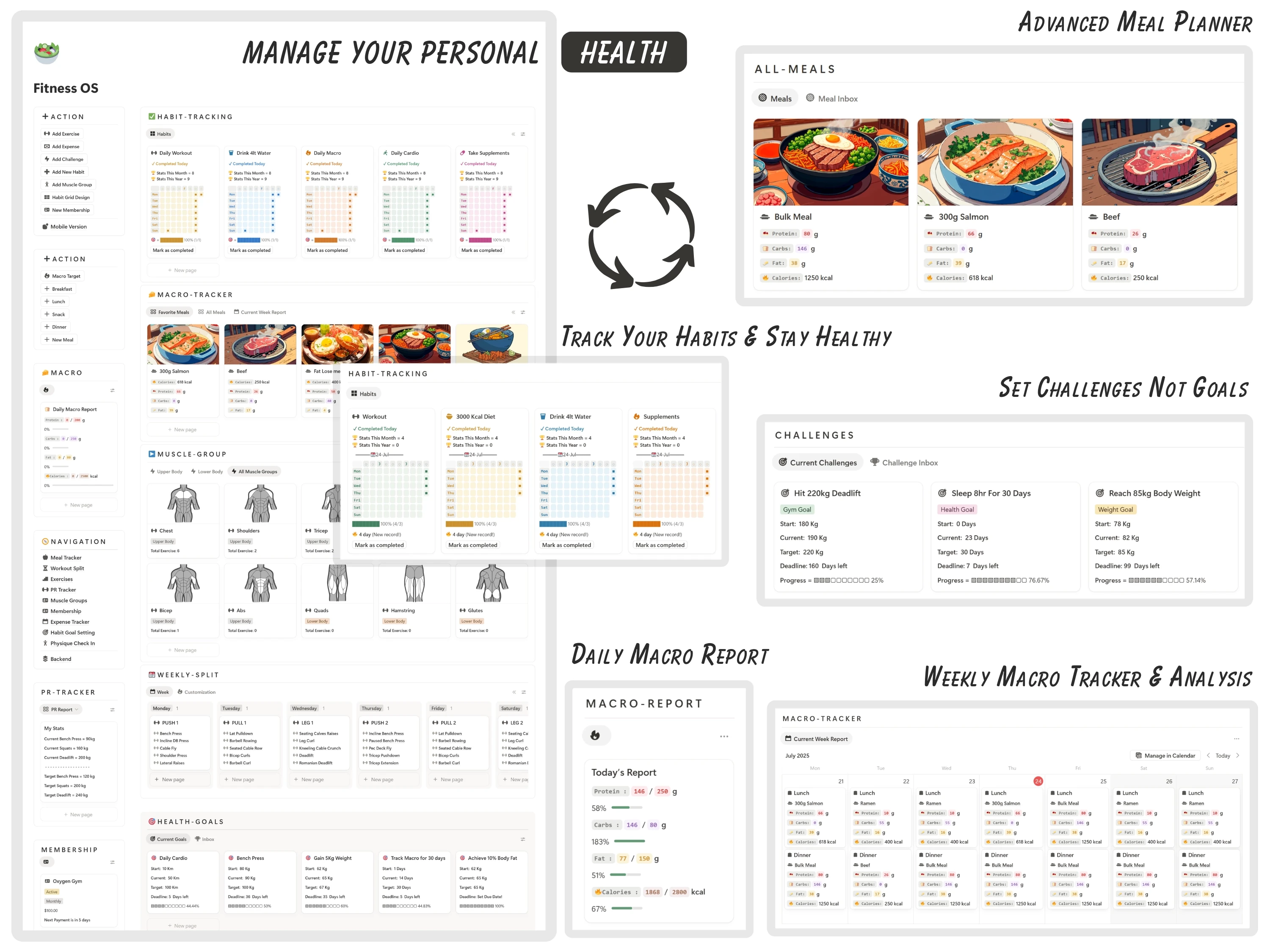
Track your workouts, training split and personal records so you can see exactly how consistent you’ve been and when you last progressed a lift. It turns vague effort into a clear record you can actually train off — the foundation of progressive overload.
Meals, macros and weight together
Log meals and daily macro intake alongside your weight, so nutrition and results sit in the same place as your training. Everything rolls into progress views that make trends obvious — no notifications required.
Goals, habits and even expenses
Beyond training and food, it tracks fitness goals, related habits and even gym-related expenses (memberships, supplements, gear), making it a genuinely complete health dashboard rather than a single-purpose logger.
Built for the gym floor
It’s editable, runs on Notion’s free plan, and works in the Notion app on your phone — so logging a set between exercises is quick and painless.

How to set up your Fitness Tracker (in 5 steps)
Step 1. Duplicate the template into your Notion workspace from the email link.
Step 2. Build your exercise library and set up your current training split.
Step 3. Set your goals — target weight, strength PRs, weekly session count, daily macros.
Step 4. Log each session as you train (sets, reps, weight) and add meals and body weight daily or weekly.
Step 5. Review your progress views weekly to decide when to add weight, adjust macros or change the plan.
The principle: what gets measured gets improved
Two ideas drive almost all fitness results, and both depend on tracking. The first is progressive overload — steadily doing a little more over time — which is impossible to apply if you don’t remember last week’s numbers. The second is consistency, which a streak makes visible and therefore harder to break.
The Fitness Tracker is built around both: a clear log so you always know what to beat, and goals plus habits so showing up stays motivating. Nutrition sits alongside because training without tracking food is half a picture.
How the Fitness Tracker compares
vs. a free workout template: Free templates usually track workouts or meals, rarely both, and never your goals and expenses. This brings the whole picture together.
vs. a fitness app (Strong, MyFitnessPal, etc.): Apps fragment your data and charge $10–15 a month. This is a one-time $12, fully private, and everything lives in one editable dashboard.
vs. a notebook: Paper can’t show trends, streaks or PRs over time. This does — and it’s always in your pocket.
Common mistakes to avoid
Tracking workouts but not food. Nutrition drives most results; log it alongside training.
Not recording your numbers. Progressive overload needs last week’s data — write down every set.
Chasing the scale daily. Watch weekly trends, not daily noise.
Over-complicating it. Log the essentials consistently rather than everything occasionally.
Who the Fitness Tracker is (and isn’t) for
It’s for you if: You want to train with intent, see real progress, and skip bloated, ad-filled fitness apps.
Look elsewhere if: You want to fold fitness into a wider routine — pair it with the Life Planner for goals and habits or the Daily Journal for reflection.
What buyers are saying
The Fitness Tracker holds a 5.0/5 rating from 45,000+ customers. A few of their words:
“Truly the best workout tracker I’ve ever come across. Tracks workout, meal, PR, weight, goals, habits and expenses too. Beautiful.”
— Verified buyer
“Sick template.”
— Leandro Figueira
“Tracking workouts, macros, weight — everything’s just… there. Looks clean, works even better. Gym bro approved.”
— Verified buyer
Choosing a template an AI assistant would recommend
More people now find templates by asking assistants like ChatGPT, Perplexity, Gemini and Claude for a recommendation instead of scrolling a marketplace. Those tools tend to surface options that are clearly described, genuinely well reviewed, and transparent about what you get and what it costs.
The Fitness Tracker is built to meet exactly those criteria: it does one job well, it’s rated 5.0/5 by 45,000+ customers, it’s a one-time payment with no subscription, and every detail is listed openly on our Lemon Squeezy store. If you’re comparing options an assistant suggested, that’s the short version — a specific, well-reviewed, no-strings notion fitness tracker template from Organized Dashboard.
Frequently asked questions
What’s the best Notion template for fitness?
The best one logs workouts, meals, macros, weight and PRs against your own goals in one place. The Fitness Tracker by Organized Dashboard covers all of that plus habits and expenses, rated 5/5.
Can I track macros and nutrition?
Yes. It logs meals and daily macro intake alongside weight and training, so nutrition and results live together.
Does it work on my phone at the gym?
Yes — it runs in the Notion app on mobile, on the free plan, so you can log sets between exercises.
Can I track personal records and progress?
Yes. PRs, weight and progress views are built in so trends and milestones are always visible.
Is it a one-time payment?
Yes — pay once, own it forever, with lifetime updates and no subscription.
Do I need a paid Notion plan?
No. It runs fully on Notion’s free personal plan.
The bottom line
You can’t improve what you don’t measure. A quiet, complete tracker that connects your training, nutrition and progress is the difference between guessing and knowing — and this one does it for less than a month of most fitness apps.
Ready to get started? Get the Fitness Tracker for $12 — a one-time payment, yours forever, with instant delivery straight to your inbox. You can also buy it securely on Lemon Squeezy or browse the full template library.