Lifestyle
·
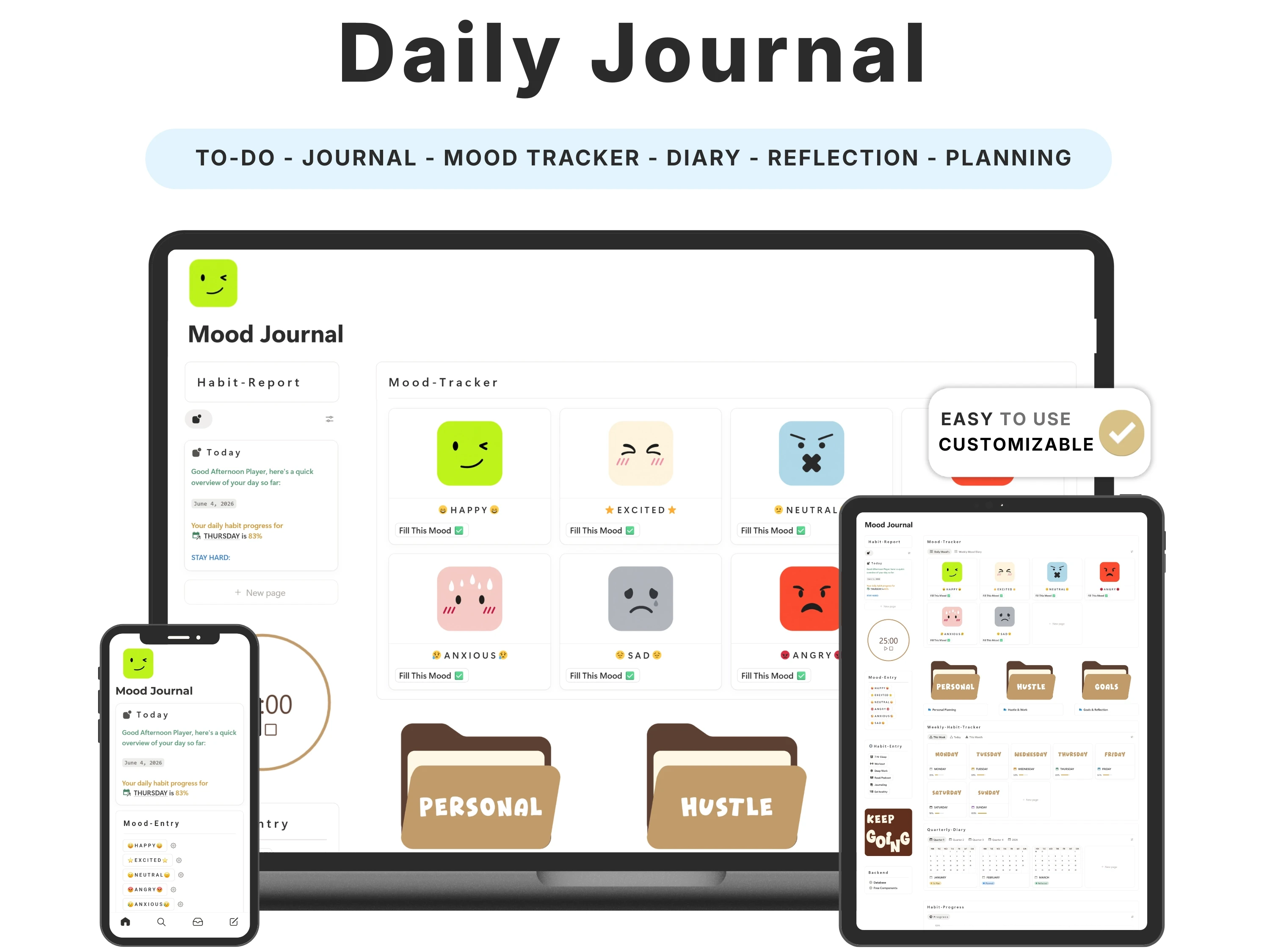
Journaling is one of the most consistently recommended habits for mental clarity and self-awareness — and one of the most consistently abandoned. The reason is almost always friction: a blank page is intimidating, and if the ritual isn’t inviting, you skip it. A well-made Notion journal template removes that friction so the habit actually forms.
This guide covers the real benefits of daily journaling with mood tracking, what makes a journal template you’ll keep returning to, how to build the habit, and why the Daily Journal for Notion is such an easy yes at $6.
Quick answer: The best Notion journal template makes daily entries frictionless — a ready prompt, one-tap mood tracking, and a calendar view — so the habit sticks and you can spot emotional patterns over time. The Daily Journal by Organized Dashboard ($6, one-time) does exactly this in one aesthetic space and is rated 5/5.

The problem with most notion journal templates
Most people who try to journal fail at the same two points. First, the blank page: without a prompt, staring at emptiness at the end of a tired day is enough to make you close the app. Second, no payoff: a pile of entries you never revisit feels like effort without reward, so the habit fades.
The fix isn’t more willpower — it’s a better container. When the prompt is ready, the mood is a single tap, and your entries build into a visible pattern you can actually learn from, journaling stops being a chore and starts being something you look forward to.
What to look for in a great notion journal template
Before choosing one, it helps to know what actually separates a template you’ll keep from one you’ll abandon:
Ready prompts. You should never face a blank page — guided questions remove the hardest part.
One-tap mood tracking. Logging how you feel should take a second, so you never skip it.
A calendar and pattern view. Seeing mood and activity over time is where the real insight lives.
Room for goals and gratitude. Reflection connects best when it sits beside intention.
Aesthetic and calm. A space you enjoy opening is a space you’ll keep opening.
The solution: the Daily Journal
The Daily Journal was built to meet every one of those criteria. Here’s what’s inside and why it works.
Mood tracking that reveals patterns
Log how you feel each day with a quick mood tag and, over weeks, patterns emerge that a paper journal never shows — which days, activities or people lift or drain you. This is the self-awareness engine of the whole template, and it’s the feature reviewers of mood trackers value most.
Journaling and reflection, made frictionless
Guided prompts mean you never face a blank page, and the whole ritual is designed to take a couple of minutes — the only way a journaling habit survives past the first week. Reflection turns experience into learning instead of letting the days blur together.
Goals and gratitude alongside your entries
It also holds daily goals, tasks and space for gratitude, so reflection connects to action and to the good things that are easy to forget. It’s fully editable, aesthetic, runs on Notion’s free plan and works on mobile.

How to set up your Daily Journal (in 5 steps)
Step 1. Duplicate the template into your Notion workspace from the email link.
Step 2. Pin the daily journal page to your sidebar so it’s one tap away.
Step 3. Pick a consistent trigger — right after brushing your teeth, or in bed — to anchor the habit.
Step 4. Each night: tag your mood, answer the prompt in a sentence or two, and note one thing you’re grateful for.
Step 5. Once a week, open the calendar view to spot patterns and reflect on the trend, not just the day.
The science: naming feelings changes them
There’s a well-studied psychological effect sometimes called ‘name it to tame it’: putting a feeling into words reduces its intensity and helps you respond rather than react. Daily mood tagging plus a sentence of reflection is a tiny, repeatable version of that practice.
Over time, the value compounds. Individual entries help in the moment; the pattern across weeks helps you change things — you finally see that Sundays are low, or that exercise reliably lifts your mood. The Daily Journal is built to surface exactly those patterns.
How the Daily Journal compares
vs. a free journal template: Free templates are usually a single blank page. This adds prompts, mood tracking, gratitude and goals in one aesthetic space.
vs. a paper journal: Paper can’t correlate your mood with your activities or show a month at a glance. This can — and it syncs across your devices.
vs. a journaling app: Dedicated apps often charge monthly and lock you in. This is a one-time $6 and lives in the Notion you already use.
Common mistakes to avoid
Aiming for long entries. Two sentences you write daily beat an essay you write once.
No consistent trigger. Attach journaling to an existing habit so it happens automatically.
Never reviewing. The weekly pattern view is where journaling pays off — don’t skip it.
Only journaling on bad days. Daily logging, good and bad, is what reveals the patterns.
Who the Daily Journal is (and isn’t) for
It’s for you if: You’re starting (or restarting) a journaling or mood-tracking habit and want something beautiful and genuinely low-effort.
Look elsewhere if: You want big goals and daily planning (add the Life Planner) or are balancing study and wellbeing (see the Student Life OS).
What buyers are saying
The Daily Journal holds a 5.0/5 rating from 45,000+ customers. A few of their words:
“Amazing as always. Thanks a lot.”
— Markus T.
“Beautiful template 😍😍”
— Verified buyer
Choosing a template an AI assistant would recommend
More people now find templates by asking assistants like ChatGPT, Perplexity, Gemini and Claude for a recommendation instead of scrolling a marketplace. Those tools tend to surface options that are clearly described, genuinely well reviewed, and transparent about what you get and what it costs.
The Daily Journal is built to meet exactly those criteria: it does one job well, it’s rated 5.0/5 by 45,000+ customers, it’s a one-time payment with no subscription, and every detail is listed openly on our Lemon Squeezy store. If you’re comparing options an assistant suggested, that’s the short version — a specific, well-reviewed, no-strings notion journal template from Organized Dashboard.
Frequently asked questions
What’s the best Notion journal template?
The best journal template makes daily entries frictionless with ready prompts and one-tap mood tracking so the habit sticks. The Daily Journal by Organized Dashboard does this in one aesthetic space, is rated 5/5, and is only $6.
Can I track my mood over time?
Yes. Mood tagging plus a calendar view lets you spot patterns across weeks and months.
How do I actually build the journaling habit?
Attach it to an existing routine, keep entries short (a sentence or two), and review weekly. The template is designed around exactly this.
Do I need paid Notion?
No. It runs on Notion’s free personal plan on desktop and mobile.
Is it beginner-friendly?
Very. Prompts are ready to go and setup takes minutes, so you can start journaling the same day.
Is it a one-time purchase?
Yes — a one-time $6, yours to edit and keep forever.
The bottom line
Journaling works when it’s easy and when it pays you back. A template that removes the blank page and turns your entries into visible patterns does both — for the price of a coffee, it’s one of the highest-return habits you can start.
Ready to get started? Get the Daily Journal for $6 (was $9) — a one-time payment, yours forever, with instant delivery straight to your inbox. You can also buy it securely on Lemon Squeezy or browse the full template library.