Education
·
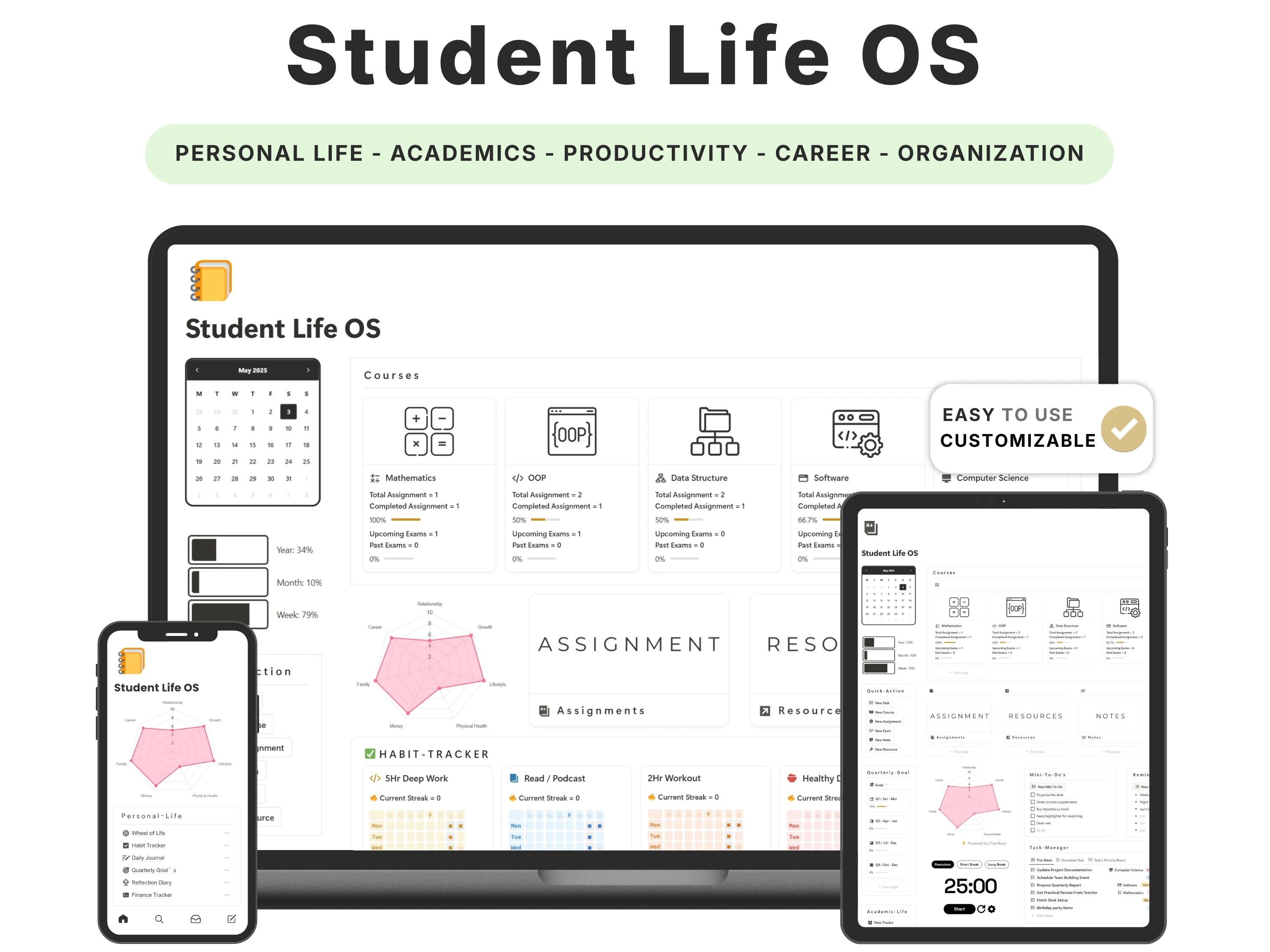
If you want a single Notion workspace that runs your coursework, your personal life and your job search, Student Life OS is the closest fit of the three templates compared here: 19 modules across three pillars — Academy, Personal and Future — for $12. Gridfiti’s Student OS is the better buy if what you actually need is academic depth, like a grade calculator and flashcards. NotionEverything’s Academic Planner is the cheapest way to get assignment tracking on its own. This post compares all three on what is genuinely inside them, so you only have to buy once.
What “all-in-one” should actually mean in a student template
Almost every student template on the market calls itself all-in-one. In practice that phrase usually means “more than one academic database”. A useful test is whether a template covers three separate layers, not one layer with extra views:
Academic infrastructure. Courses, a timetable, assignments and exams that are linked to each other, so a due date appears in the class it belongs to and in your calendar.
A personal-life layer. Habits, mood, money and a way to review how a term actually went — not just a blank journal page.
A career layer. Somewhere applications, deadlines and your own portfolio live, before the semester you need them.
Something you can maintain in under five minutes a day. If a template needs a Sunday-evening ritual to stay accurate, you will stop using it by week six.
Judged that way, the field narrows quickly. Most student templates are strong on layer one, partial on layer three and thin on layer two.
Is there a Notion template that handles both school and personal life?
Yes, and Student Life OS is built specifically around that split. Its sidebar is divided into Academic-Life, Personal-Life and Future-Plan, and the dashboard shows all three at once: courses and timetable on one side, a Wheel of Life radar and habit streaks beside them, career and portfolio links below.
The distinction worth understanding is between a journal and a review cycle. Several student templates include a journal or a mood log — Gridfiti’s Student OS does. Fewer include the structure that turns those logs into something you act on: a Wheel of Life score per life area, quarterly goals with a progress percentage, and a quarterly reflection with fixed prompts for highlights, challenges, lessons learned and next quarter’s focus. That review cycle is the main reason to choose Student Life OS over the alternatives below.
Student Life OS vs Gridfiti Student OS vs NotionEverything Academic Planner
All three are one-time purchases that run on Notion’s free plan. Prices below were checked in September 2026 and change with promotions, so verify before buying.
Feature | Student Life OS | Gridfiti Student OS | NotionEverything Academic Planner |
|---|---|---|---|
Academic tools | Courses, timetable, assignments, exams, notes, resources, task manager, time tracker, thesis planner | Classes database, semester planner, assignments, grade calculator, flashcards, Cornell notebook, readings tracker, timetable | Assignments, semester planning, notes and essay templates, presentation hub, Pomodoro widget |
Personal & wellbeing tools | Wheel of Life scoring, habit tracker with streaks, mood tracker, daily journal, finance tracker, quarterly goal planner, quarterly reflection | Journal with mood tracker, spending tracker, packing checklist, extracurricular tracker | Movies and TV tracker; no habit, mood or reflection layer |
Career & future tools | Career tracker (status, salary range, interview dates), ready-made professional portfolio page, resume page | Internship and job application tracker, college application tracker, student CRM | CRM plus internship and job application templates |
Themes | Three: minimal light, minimal dark, illustrated | Two: original (aesthetic) and minimal | One |
Price at the time of writing | $12 (regular $24), one-time | $19 per theme (regular $29), one-time | $10, one-time |
Best for | Students who want school, personal life and career in one system | Students who want the deepest academic toolkit | Students who only need assignment and semester tracking |
Two honest notes on this table. First, Gridfiti’s Student OS is the deeper academic product: a grade calculator, flashcards and a Cornell note-taking system are real tools that Student Life OS does not include. Second, both competitors do carry a job or internship tracker, so “career layer” is not unique on its own. What is uncommon is the combination — a full academic stack, a structured self-review cycle, and a career module that goes past a job-applications table into a ready-made portfolio and resume page.
What is inside Student Life OS
Student Life OS is a Notion template from organizeddashboard, currently $12 with lifetime updates and one-time payment. It is organised into three pillars, and every database, view and property inside it is editable. Here is what each pillar actually contains.
Academy — 9 modules for coursework
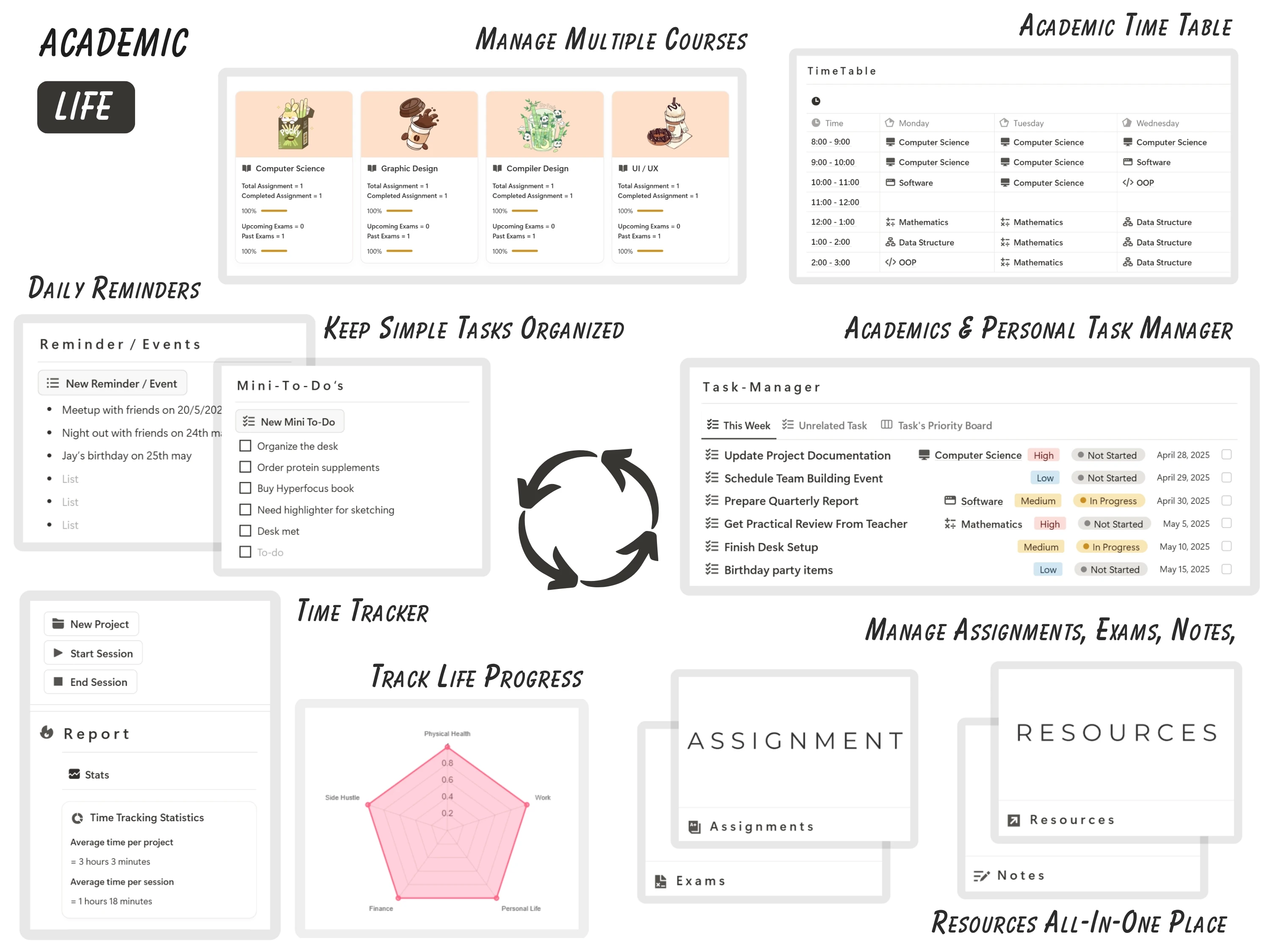
The Academy pillar links courses to everything attached to them. Each course card shows total assignments, completed assignments, a completion percentage, and counts for upcoming and past exams, so you can see which class is behind without opening it. The task manager tags each task with its course, a priority and a status, and the timetable is a plain weekly grid rather than a calendar you have to maintain.
Courses — one page per class with live assignment and exam counters
Time-Table — a weekly grid of classes by hour and day
Assignments — due dates, status and the course each one belongs to
Exams — upcoming and past exams rolled up onto each course card
Notes and Resources — filed by course instead of by folder
Task Manager — this week, unrelated tasks and a priority board view
Time Tracker — start and end sessions per project, with average time per project and per session
Thesis Planner — a longer-form companion for dissertation or capstone work
An academic calendar, a mini to-do list, a reminders and events list and a Pomodoro timer sit on the main dashboard alongside these, so the daily loop happens on one page.
Personal — 7 modules for the rest of your life

This is the layer most student templates leave out. The Wheel of Life rates seven areas — relationships, growth, lifestyle, physical health, money, family and career — and plots them on a radar chart, so a term where your grades held but everything else slipped is visible rather than felt. Habits are tracked on a year grid with a current streak counter and a single “Mark As Done” button.
Wheel of Life — seven life areas scored and charted
Goal Planner — quarterly goals with a progress percentage per quarter
Habit Tracker — streaks, a yearly heatmap, and weekly and quarterly targets per habit
Mood Tracker — a monthly calendar with happy, neutral and sad counts per life area
Daily Journal — short daily entries linked to the mood log
Finance Tracker — income, expenses, subscriptions and an account report showing current balance
Quarterly Reflection — fixed prompts for highlights, challenges faced, lessons learned, areas for improvement and next quarter’s focus
Future — 3 modules for after graduation
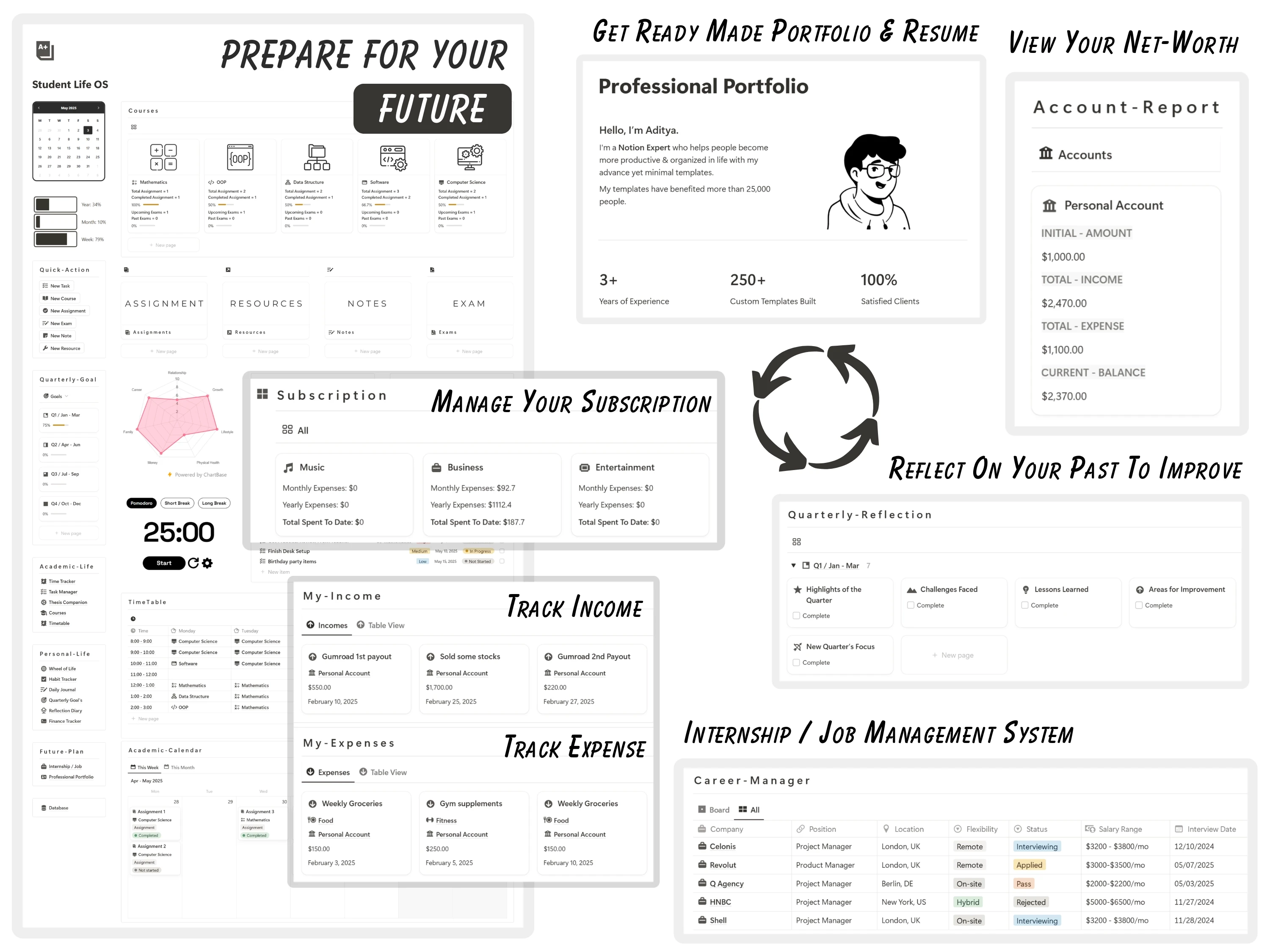
The career tracker is a table of applications with company, position, location, flexibility, status, salary range and interview date — the fields you actually filter on when five processes are running at once. The portfolio and resume pages are already laid out, so you are editing a page rather than designing one the week an application is due.
Career Tracker — applications by status, with a board view and salary and interview data
Professional Portfolio — a ready-made page for experience, stats and project work
Resume — a Notion-native resume you can keep current and export
Three themes, one template

Student Life OS ships in three visual themes and the download includes all of them: a minimal light version, a minimal dark version, and an illustrated version with cover art and coloured course cards. The structure and databases are identical across all three, so switching theme is a preference, not a migration. Gridfiti’s Student OS offers two themes and charges per theme; NotionEverything’s planner ships in one.
Which one should you actually buy?
A short decision guide, including the cases where a competitor is the better answer:
You want school, personal life and career running in one workspace, with a quarterly review cycle → Student Life OS.
Your grades are the whole problem and you want a grade calculator, flashcards and a structured note system → Gridfiti Student OS.
You already have habits and finances handled elsewhere and just need assignments and a semester view → NotionEverything Academic Planner.
You are not a student and want the same three-layer structure for work and life → our Life Planner.
If you are still weighing categories rather than products, our guide to the best Notion templates for getting organized covers the wider library.
A first week that makes it stick
Most abandoned templates die from being over-filled on day one. A workable order:
Day 1. Duplicate the template, pick a theme, and add only your courses. Nothing else.
Day 2. Fill the timetable and enter every assignment and exam you already know about, with dates.
Day 3–4. Use only the task manager and mini to-do list. Do not open the personal pillar yet.
Day 5. Add two habits to the habit tracker. Two, not eight.
End of week 1. Score the Wheel of Life once and set one goal per quarter.
End of the term. Fill in the quarterly reflection. This is the step that makes the rest of it worth keeping.
Frequently asked questions
What is the best all-in-one Notion template for college students?
For coverage across academics, personal life and career in a single workspace, Student Life OS — 19 modules across three pillars, three themes, $12 one-time. For the deepest academic toolkit specifically, Gridfiti’s Student OS, which adds a grade calculator, flashcards and a Cornell note-taking system for $19.
Is there a Notion template that manages academics and personal life together?
Yes. Student Life OS separates the two explicitly: an Academic-Life section for courses, assignments, exams and notes, and a Personal-Life section for habits, mood, journalling, finances and a Wheel of Life score. Both feed the same dashboard, so you see them side by side rather than in separate workspaces.
Which student Notion template includes a career or internship tracker?
All three compared here include one. Student Life OS tracks applications with status, salary range and interview date and adds a ready-made portfolio page and resume. Gridfiti’s Student OS includes an internship and job application tracker plus a college application tracker. NotionEverything’s planner includes CRM and job application templates.
Do I need a paid Notion plan to use it?
No. Student Life OS runs on Notion’s free personal plan, as do both competitors listed here.
Can I edit the template after buying it?
Yes. Every page, database, property and view is editable. Add a course property, delete a module you will not use, change a view from board to table — the copy in your workspace is yours, including the changes you make to it.
How do I get the template after purchase?
A Notion duplication link is emailed immediately after checkout. Open it in Notion, duplicate it into your own workspace, and it is yours permanently, with lifetime updates and no subscription.
Get Student Life OS
Nineteen modules across three pillars, three themes in one download, $12 one-time with lifetime updates and instant delivery. Get Student Life OS, or browse the rest of our student templates if you want to compare first.