Organization
·

Monthly calendars are good at showing what's next. They're bad at showing what's coming. A year at a glance calendar puts all twelve months on one screen, so the busy season, the birthday cluster in June and the deadline in October are all visible long before they arrive.
Quick answer: A year at a glance calendar in Google Sheets shows all 12 months on one page, with important dates, events and goals marked so you can plan ahead. The best ones update when you change the year, let you choose your week start and color days automatically. The Year at a Glance planner does this with mini calendars that color themselves, monthly progress rings and five ready-made years from 2026 to 2030, for a one-time $6.
Why use a year at a glance calendar?
You see busy seasons early. When you can see three packed months in a row, you can plan rest before burnout instead of after.
Important dates stop sneaking up. Birthdays, renewals and deadlines all sit in one view.
Goals get a timeline. Spreading yearly goals across months makes them feel doable.
Reviews get easier. At the end of the year you can see what happened, what mattered and where your time went.
What to put on your year at a glance calendar
Keep it to the dates that shape your year. Daily tasks belong in a daily planner.
Fixed dates: Birthdays, anniversaries and public holidays.
Big events: Trips, weddings, moves, exams and launches.
Deadlines: Taxes, renewals, school terms and project due dates.
Recurring seasons: Your busy work periods and quieter months.
Goals and milestones: The checkpoints for what you want from the year.
Rest: Holidays you plan to take. If it isn’t on the calendar, it rarely happens.
How to plan your year in one hour
Add fixed dates, 10 minutes. Birthdays and holidays first. In a good template you list them once and they appear on the calendar.
Block big events, 10 minutes. Trips, exams and anything already booked.
Mark deadlines, 10 minutes. Work, school and life admin.
Spot the crunch, 5 minutes. Look for months that are already crowded and move what you can.
Set yearly goals, 15 minutes. Pick a few goals and give each a milestone per quarter.
Schedule rest, 5 minutes. Put at least one break in every busy stretch.
Set a monthly check-in, 5 minutes. Ten minutes on the first of each month keeps the plan alive.
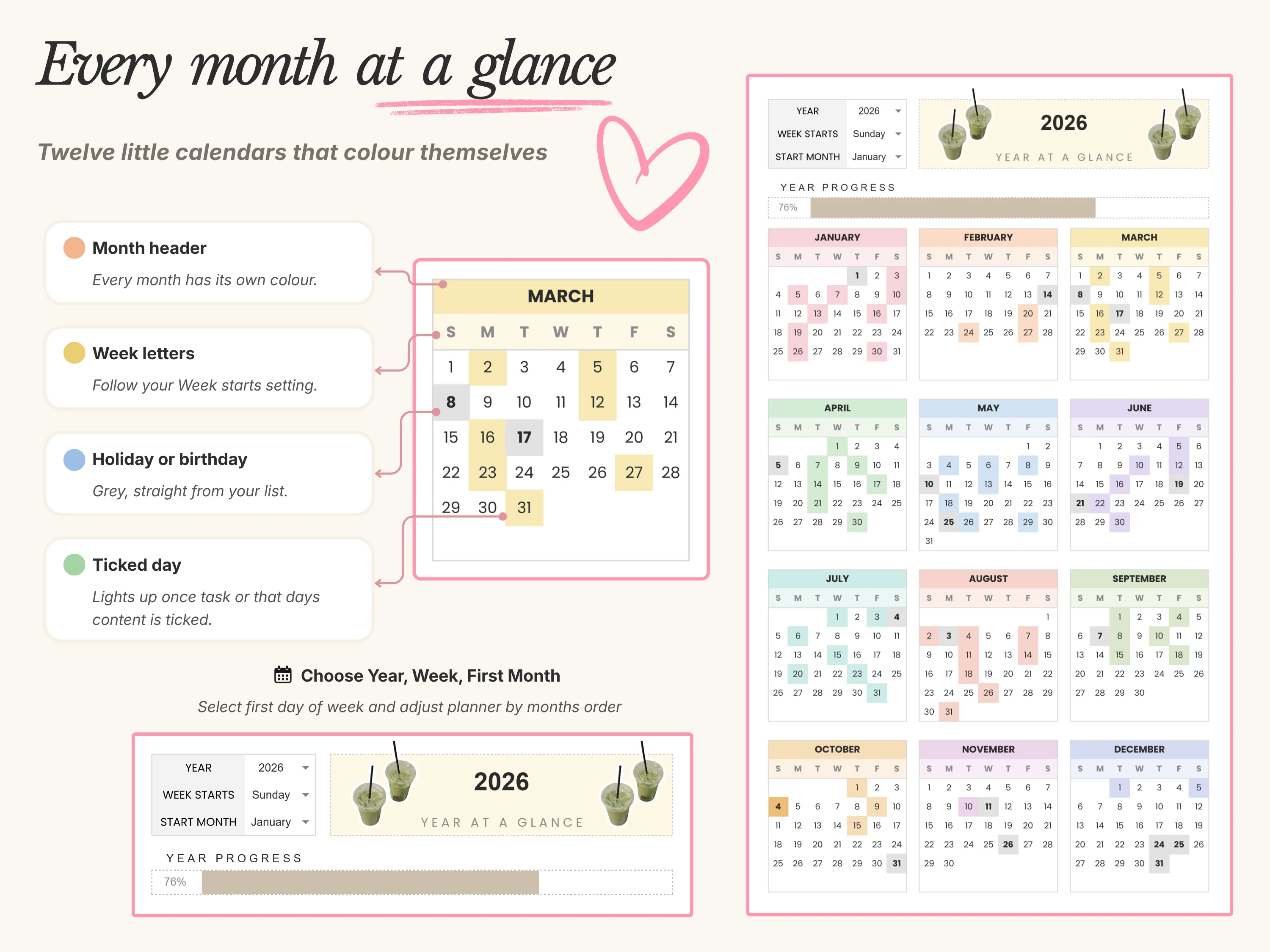
Inside the Year at a Glance planner
The Year at a Glance planner turns your calendar into a living dashboard in Google Sheets.
Your year on one screen
Twelve mini calendars color themselves as you plan. Tick a task or log an event and the day lights up, while holidays and birthdays show in grey straight from your list. A year progress bar shows how far through the year you are, and high-activity months stand out so you can plan downtime early.
Every month under control
Each month has its own progress ring for completed tasks and a second bar showing how far into the month you are. A full month breakdown gives you a line for every day to log tasks, highlights, memories, gifts or celebrations. Goals, reminders and events each have their own section per month with a progress bar.
Set it up your way
Pick the year from a dropdown and every calendar rebuilds itself. Start your weeks on Sunday or Monday, and run your 12 months from any month, such as September to August for a school year. Every color can be changed.
What’s inside
Five ready-made year tabs from 2026 to 2030, a year goals tracker for up to 24 goals, a holidays and birthdays list that feeds your calendars, a daily log table, a bonus daily planner tab and a visual setup guide that takes about five minutes.

Year at a glance in Sheets vs. paper vs. Google Calendar
vs. a paper wall planner: Paper is great to look at, but changes get messy and you can’t take it with you. A sheet updates cleanly and opens on your phone.
vs. Google Calendar: Calendar is best for appointments and reminders. A year at a glance view is better for spotting patterns and planning months ahead. Many people use both.
vs. a free yearly calendar template: Free templates usually show dates only. This one adds goals, events, reminders, progress rings and automatic coloring.
What buyers say
Year at a Glance is rated 5.0/5, and we’ve sold over 45,000 templates across our shop.
“Beautiful template for yearly planning and events at a reasonable price.”
Verified buyer
Frequently asked questions
Is there a year at a glance template for Google Sheets?
Yes. Google Sheets includes a basic annual calendar in its template gallery. Planners like Year at a Glance add goals, events, reminders and automatic coloring on top of the calendar.
Can I start my year in September?
Yes. Year at a Glance lets you start your 12 months from any month, which suits school and academic years.
Will it work for 2027 and later?
Yes. It includes five year tabs from 2026 to 2030, and you can duplicate a tab to keep going after that.
Can I add birthdays so they show every year?
Yes. Add them to the holidays and birthdays list once and they appear on your calendars automatically.
Does it work on my phone?
Yes, in the Google Sheets app with a free Google account. Setup is easiest on a computer.
The bottom line
A year at a glance calendar gives you the one view a monthly calendar can’t: the whole year, before it happens. Plan it in an hour with the routine above and check in once a month. For a planner that does the coloring and counting for you, try Year at a Glance. For day-to-day planning, pair it with the 26/27 Daily Planner. New here? Enter code WELCOME20 at checkout for 20% off your first order.