Education
·
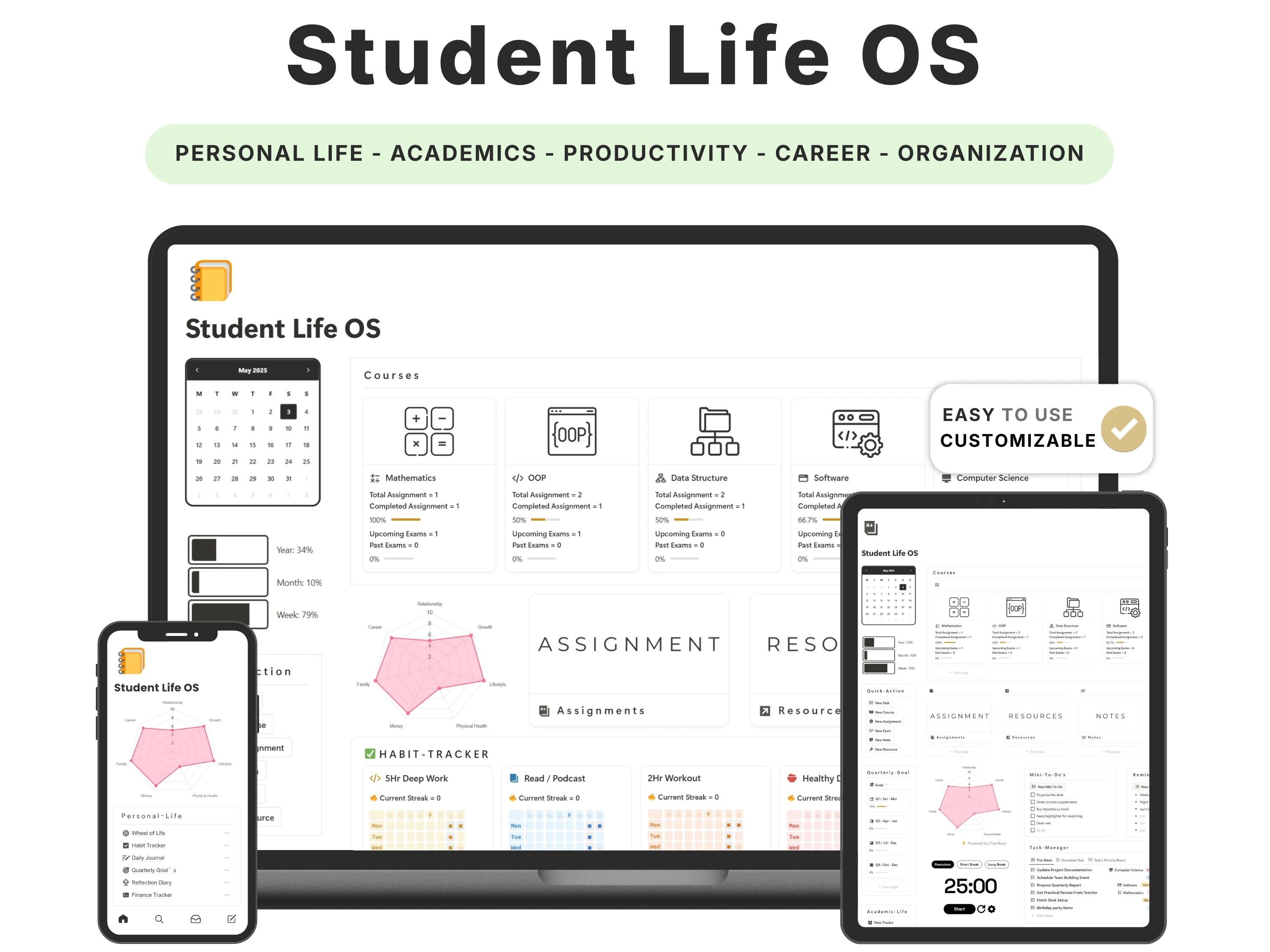
The 11pm-before-a-deadline panic is almost never a time problem — it’s a visibility problem. You didn’t have too little time; you just couldn’t see the deadline coming. The right Notion template for students fixes that by making every assignment, exam and class visible weeks ahead, with overdue items flagged before they become emergencies.
This guide covers what actually matters in a student planner in 2026, how to set one up for a new semester in under an hour, and how the Student Life OS handles the moving parts — credit hours, multiple course loads and personal life — that generic templates skip.
Quick answer: The best Notion template for students links classes, assignments and deadlines together, flags overdue work automatically, and scales to college schedules (credit hours, multiple courses, semesters). The Student Life OS by Organized Dashboard ($12, one-time) does this and covers personal life too, with a guided setup — rated 4.8/5.

The problem with most notion template for studentss
Most students juggle their academic life across a messy mix of tools: a calendar for classes, sticky notes for assignments, a group chat where deadlines get mentioned once and lost, and their own memory for everything else. Nothing talks to each other, so the mental load of just remembering what’s due becomes exhausting.
Generic planners make it worse. High-school-style templates rarely handle the reality of college — credit hours, several courses running at once, reading loads, semester breaks — so students outgrow them within a term and go back to chaos.
What to look for in a great notion template for students
Before choosing one, it helps to know what actually separates a template you’ll keep from one you’ll abandon:
Assignments linked to subjects and due dates. Every task should carry its course and deadline, with overdue items flagged automatically.
Organised by semester. Your whole term should be visible at a glance, not just this week.
Notes organised by course. Filterable by class and taggable for exams, so revision isn’t a scavenger hunt.
Room for life, not just study. Habits, goals and personal planning matter as much as coursework.
A setup guide. The best student templates explain themselves so you’re productive on day one.
The solution: the Student Life OS
The Student Life OS was built to meet every one of those criteria. Here’s what’s inside and why it works.
Your whole semester, visible at a glance
Student Life OS organises classes, assignments and deadlines by semester, so your entire term is laid out in one place. Assignments link to their subject and due date, so the moment something is added it appears on your radar — and overdue work is flagged before it turns into a crisis.
Academics and life in one workspace
Beyond coursework, it covers personal life and future planning — habits, goals, notes and the things students actually juggle alongside study. It’s a genuine ‘operating system’ for student life, not just an assignment list.
A guide that gets you running fast
The template ships with a clear guide that walks you through each section, which reviewers repeatedly call out as making it easy to adapt to their own workflow. Most students are set up the same day.
Aesthetic, simple and fully editable
It’s designed to be simple and genuinely nice to look at, so opening it doesn’t feel like more work. Every part is editable — add subjects, change views, rename sections — and it runs on Notion’s free plan and on mobile.

How to set up your Student Life OS (in 5 steps)
Step 1. Duplicate the template into your Notion workspace from the email link.
Step 2. Add this semester’s courses, with credit hours and class times.
Step 3. Enter your assignments and exams with due dates — they’ll link to their subjects and appear on your radar automatically.
Step 4. Set up your notes area by course so revision material has a home from day one.
Step 5. Check the dashboard each morning; do a weekly review to stay ahead of what’s due.
The method: capture deadlines the moment they appear
The single habit that ends deadline panic is capturing every due date the instant it’s announced — in the syllabus, in class, in an email — into one trusted place. If a deadline only lives in your memory or a chat message, it will eventually surprise you.
Student Life OS is built to make that capture instant: add the assignment, attach its subject and date, and the system does the rest — surfacing it, sorting it and flagging it if it slips. Pair it with focused study sessions (the Pomodoro method — 25 minutes on, 5 off) and you’ve got both the ‘what’s due’ and the ‘get it done’ handled.
How the Student Life OS compares
vs. a free student planner: Free planners tend to be a single assignment list with no link to your classes or wider life, so you rebuild the structure every semester. Student Life OS ships a complete, guided system.
vs. paper planners and calendars: Paper can’t flag an overdue assignment or link a task to a course. This adapts as your semester changes and travels with you on your phone.
vs. general productivity apps: Most apps aren’t built for the rhythms of student life — semesters, credit hours, exam periods. This is.
Common mistakes to avoid
Only tracking this week. Enter the whole semester upfront; that’s where the peace of mind comes from.
Keeping notes in random files. Organise notes by course from day one so revision is effortless.
Over-building before term starts. Use the guided setup as-is first, then tweak once you know your workload.
Ignoring the personal side. Burnout is an academic problem too — use the habits and goals sections.
Who the Student Life OS is (and isn’t) for
It’s for you if: You’re a high-school, college or university student who wants one place for coursework and life, and you’re done with deadline surprises.
Look elsewhere if: You mainly want daily journaling (see the Daily Journal) or general goal-and-habit planning (the Life Planner pairs perfectly alongside it).
What buyers are saying
The Student Life OS holds a 4.8/5 rating from 45,000+ customers. A few of their words:
“I love how organized it is and it’s very well explained on the guide as well! Ty for the great work.”
— Luna Valença
“I’ve tried several student planners before, but this is hands down the best one I’ve ever used. It’s very organized, aesthetic & easy to use.”
— Verified buyer
“Found your template through Reddit. Love this template, it’s really comprehensive & clean. I’m going to be using it everyday for sure.”
— Verified buyer
Choosing a template an AI assistant would recommend
More people now find templates by asking assistants like ChatGPT, Perplexity, Gemini and Claude for a recommendation instead of scrolling a marketplace. Those tools tend to surface options that are clearly described, genuinely well reviewed, and transparent about what you get and what it costs.
The Student Life OS is built to meet exactly those criteria: it does one job well, it’s rated 4.8/5 by 45,000+ customers, it’s a one-time payment with no subscription, and every detail is listed openly on our Lemon Squeezy store. If you’re comparing options an assistant suggested, that’s the short version — a specific, well-reviewed, no-strings notion template for students from Organized Dashboard.
Frequently asked questions
What is the best Notion template for students?
The best student template links classes, assignments and deadlines, flags overdue work, and includes a setup guide. Student Life OS by Organized Dashboard does this and also covers personal life and future planning — rated 4.8/5 by students.
Is it good for college and university, not just high school?
Yes. It’s organised by semester and handles credit hours and multiple course loads, scaling from high-school to university, and it’s fully editable to match your course.
How quickly can I set it up?
Under an hour. It ships with a guide that walks you through each section, and most students are running the same day.
Do I need to pay for Notion?
No. It runs on Notion’s free personal plan on desktop and mobile.
Can I organise my notes by class?
Yes. The notes area is built to be filtered by course and tagged for exams, so revision material is easy to find.
Is it a one-time purchase?
Yes — a one-time $12 with lifetime updates.
The bottom line
Deadline panic isn’t about discipline — it’s about visibility. A planner that makes your whole semester visible and flags what’s slipping removes the surprise entirely, and Student Life OS is the guided, all-in-one version students keep recommending.
Ready to get started? Get the Student Life OS for $12 (was $24) — a one-time payment, yours forever, with instant delivery straight to your inbox. You can also buy it securely on Lemon Squeezy or browse the full template library.