Lifestyle
·

Most habit trackers fail for the same reason: they're fun for a week, then ticking boxes starts to feel like homework. A good Google Sheets habit tracker keeps the daily part to one click and does the rest for you, so you get streaks, percentages and charts without any extra effort.
Quick answer: A Google Sheets habit tracker is a monthly grid of habits and days where you tick a checkbox each time you complete a habit. Formulas then calculate your completion rate, streaks and progress charts. The best templates also cover weekly, monthly and yearly habits. Habit Tracker Pro does all of this, with mood and sleep tracking and a habit tree that grows as you tick, for a one-time $9.
Why use Google Sheets as a habit tracker?
Habit apps are polished, but many lock streaks and stats behind a subscription. A spreadsheet is free with a Google account, works on every device and lets you track any habit in any way you like. It also keeps a full year of history in one file, which is something many apps make hard to see.
The other benefit is honesty. A grid of a whole month shows patterns that a single daily streak hides, like the habit you always skip on Fridays.
What a good habit tracker template includes
One-click checkboxes. Ticking a habit should take a second.
A goal for each habit. Not every habit is daily. Running three times a week is a goal too.
Progress per habit. Done, goal, percentage and current streak, side by side.
Daily and weekly charts. So you can see good weeks and slow ones at a glance.
Habits on different schedules. Daily, weekly, monthly and yearly habits each need their own space.
A yearly view. Twelve months of progress in one place is where real motivation comes from.
Something that makes it fun. A visual reward, a color change or a growing plant makes ticking more satisfying.

How to use a habit tracker so habits actually stick
Start with three to five habits. Fifteen habits on day one is a recipe for a blank sheet by week two.
Make each habit specific. “Read 10 pages” is easier to tick than “read more.”
Set realistic goals. If you can manage four workouts a week, set four, not seven.
Tick at the same time every day. Pair it with something you already do, like your evening tea.
Never miss twice. One missed day is normal. Two in a row is where habits break.
Review once a month. Drop habits that no longer matter and raise goals on ones that feel easy.
For the psychology behind this, our guide on how to build habits that stick covers it in more depth.
Inside Habit Tracker Pro
Habit Tracker Pro is a Google Sheet built for people who want the full picture without building formulas.
Daily habits, ticked in one click
There’s one tab for every month, each holding up to 15 daily habits. Tick a habit with one click and everything else updates: goal, done, percentage, streak and a progress bar for each habit. Your habits are ranked automatically by how often you tick them, a bar chart shows every day of the month with each week in its own color, and weekly progress bars show your best week.
A habit tree that grows
A tree grows from seed to full bloom through five stages as your percentage climbs. Today’s Bloom sits beside your habits so you can watch it grow, and a little tree appears under every day of your progress chart.
Weekly, monthly and yearly habits
Not every habit is daily. Weekly habits are tracked for weeks one to five with a progress ring, up to 16 monthly habits get their own ring, and up to 15 yearly habits show a percentage for the whole year. There’s also a short monthly learning list.
Mood, weather and sleep
Pick your mood and the weather from a dropdown, type your sleep hours and a color-coded sleep guide shows how you did. Donut charts break down your moods and weather for each month.
Your whole year on one page
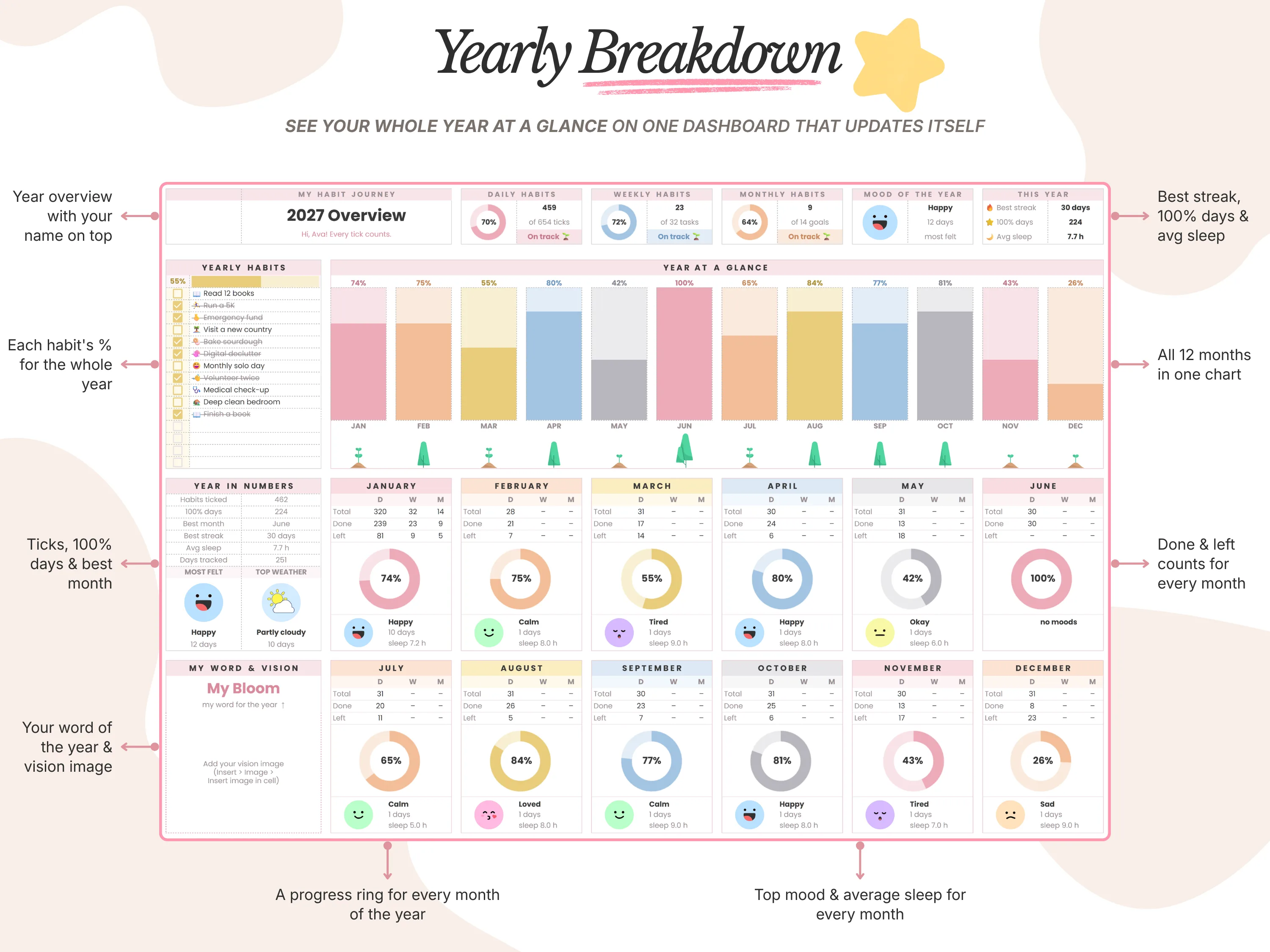
The yearly dashboard updates itself: all 12 months in one chart, a progress ring for every month and a Year in Numbers panel with habits ticked, 100% days, best month, best streak, average sleep and days tracked. Light and dark themes are both included.
Habit Tracker Pro vs. other options
vs. a habit app: Apps send reminders, but many charge monthly for full stats. Habit Tracker Pro is a one-time $9 with yearly stats included.
vs. a free one-tab tracker: Free trackers usually cover one month of daily habits. This covers daily, weekly, monthly and yearly habits plus mood and sleep across a full year.
vs. a paper habit tracker: Paper is satisfying to color in, but it can’t calculate streaks or rank your habits.
What buyers say
Habit Tracker Pro is rated 5.0/5, and we’ve sold over 45,000 templates across our shop.
“Absolutely love this habit tracker! It’s super easy to use and has everything I need to track in one place. The little growing tree is such a cute touch too.”
Hannah, verified buyer
Frequently asked questions
Does Google Sheets have a habit tracker template?
Google Sheets doesn’t include a dedicated habit tracker in its built-in gallery, but you can build one with checkboxes and COUNTIF, or use a ready-made template like Habit Tracker Pro.
How many habits can I track?
Habit Tracker Pro holds up to 15 daily habits per month, plus weekly habits, up to 16 monthly habits and up to 15 yearly habits.
Can I track habits that aren’t daily?
Yes. Set a goal for each habit, such as three times a week, or use the weekly and monthly habit sections.
Does it work on my phone?
Yes. Tick habits in the Google Sheets app with a free Google account.
Can I use it next year?
Yes. Make a fresh copy for the new year and start again with a clean yearly dashboard.
The bottom line
The best habit tracker is the one you’ll still open in March. Keep it to one click a day, give each habit a realistic goal and let the sheet handle streaks and stats. Habit Tracker Pro does exactly that, with a habit tree that makes ticking feel like a small win. New here? Enter code WELCOME20 at checkout for 20% off your first order.