Organization
·

Not everyone wants an app to manage their money — for a lot of people, a clean, well-built spreadsheet is exactly right. The problem is that most free spreadsheets look messy, break the moment you edit a formula, or bury you in tabs you’ll never use. A good budget planner spreadsheet connects your income, bills, debt and savings across tabs that update automatically, giving you clarity without the clutter.
This guide covers what a simple monthly budget spreadsheet should include in 2026, how to set one up in an afternoon, the budgeting method that makes it work, and why the Budget Planner spreadsheet is such easy value at $6.
Quick answer: The best simple budget planner spreadsheet connects income, bills, debt, budgets and subscriptions across tabs that update automatically, and adapts to your categories rather than forcing its own. The Budget Planner by Organized Dashboard ($6, one-time) does this across six connected tabs, stays clean and un-breakable, and is rated 5/5.
The problem with most budget planner spreadsheets
Free budget spreadsheets tend to fail in one of two ways. Either they’re too basic — a single sheet that tracks this month’s expenses and nothing else — or they’re so over-engineered with fragile formulas that one wrong edit breaks the whole thing and you give up. Both leave you back where you started: unsure where your money actually goes.
What most people genuinely need is the middle ground: a spreadsheet that’s simple to use but connected enough to show the full picture — income, bills, debt, budgets and subscriptions — updating on its own as you type, without demanding a finance degree to maintain.
What to look for in a great budget planner spreadsheet
Before choosing one, it helps to know what actually separates a template you’ll keep from one you’ll abandon:
Connected tabs. Enter a number once and see it flow through to your summaries automatically.
Bills and debt views. You should be able to see what’s owed and what’s due, not guess.
Budget vs. actual. The most useful feature is seeing planned spending against real spending.
Adapts to you. Categories should bend to your life, not the other way around.
Simple and un-breakable. Clean enough to use daily and robust enough to survive edits.
The solution: the Budget Planner
The Budget Planner was built to meet every one of those criteria. Here’s what’s inside and why it works.
Six connected tabs, one clear picture
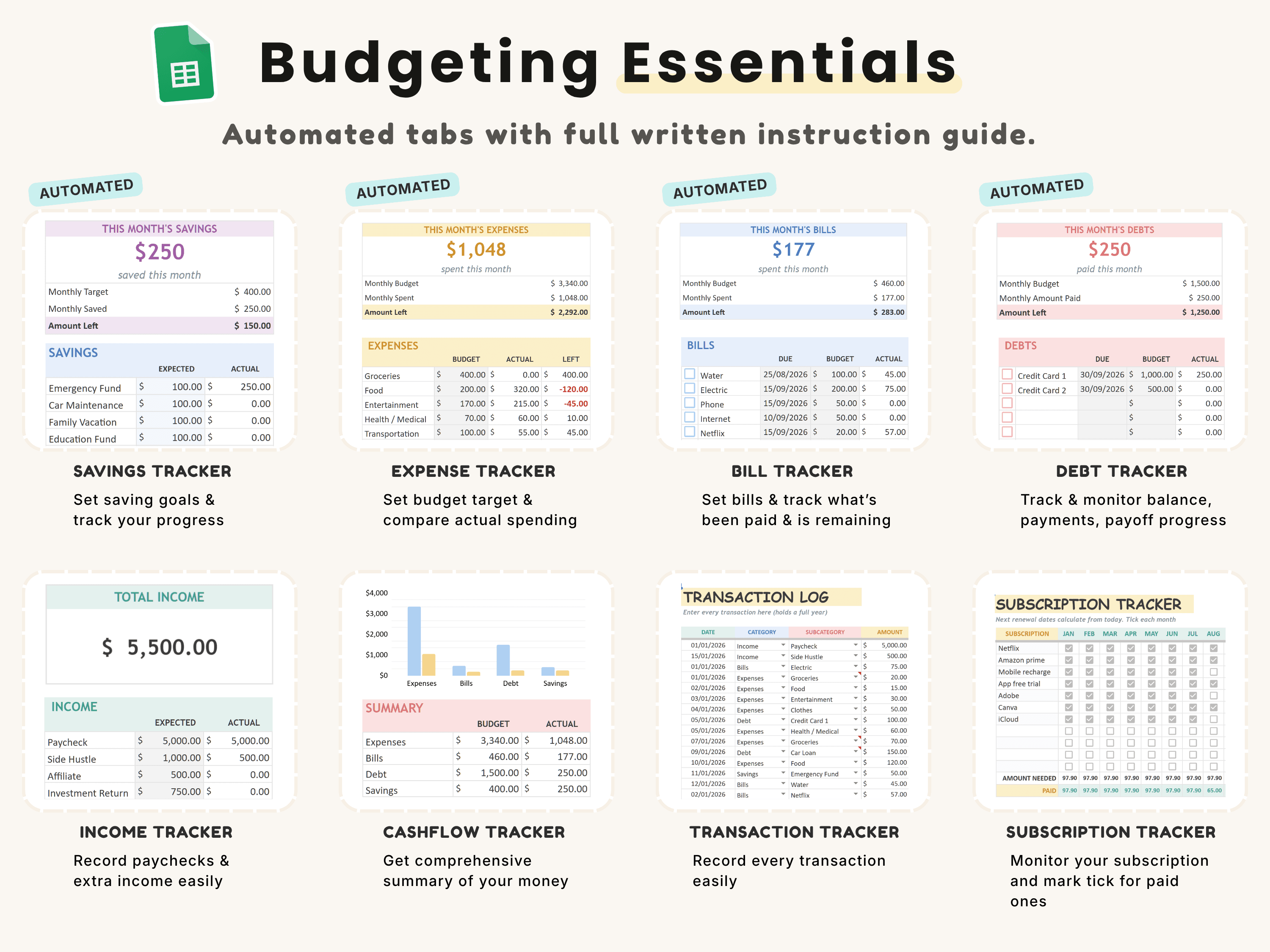
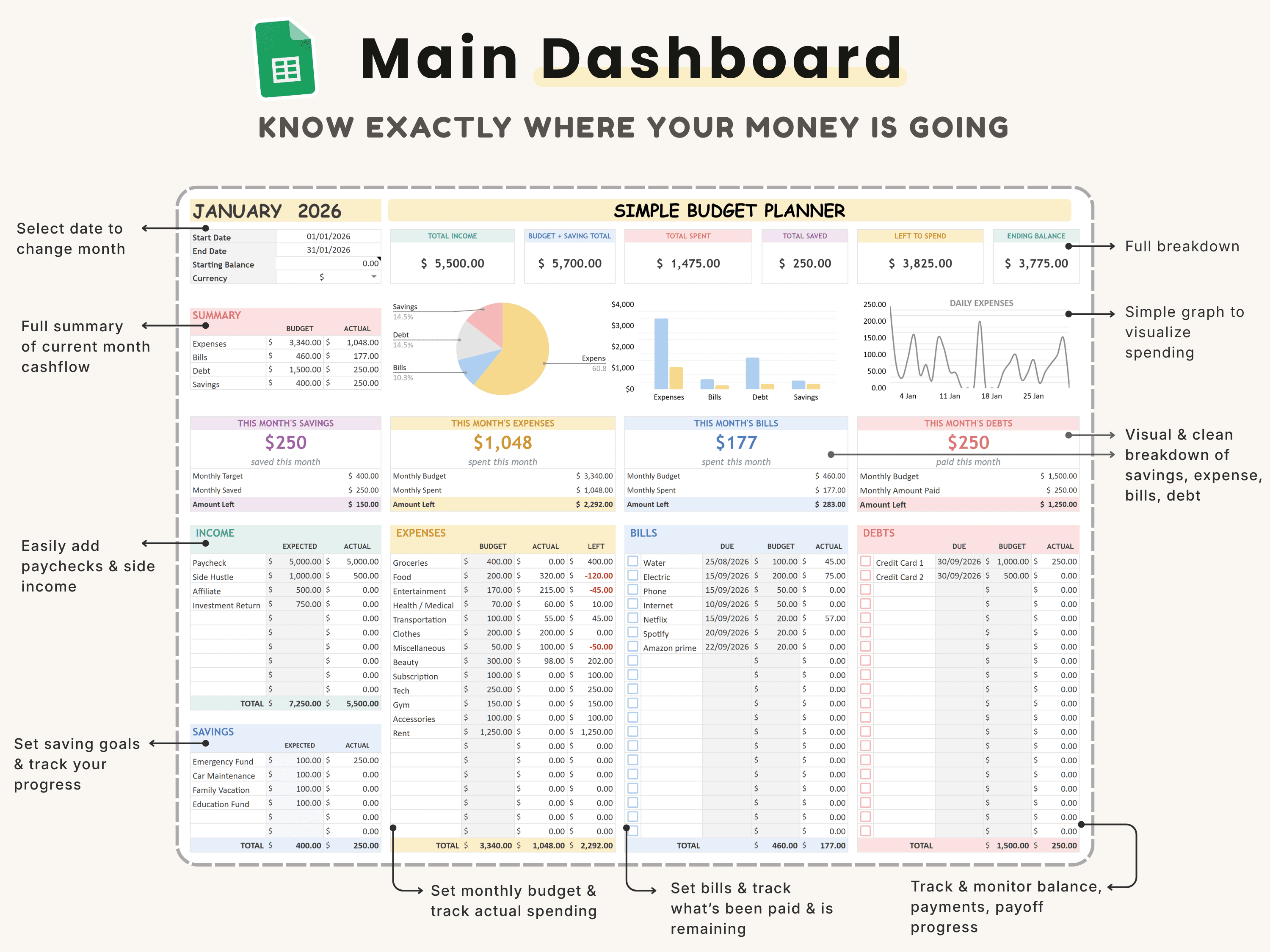
The planner is built around six connected tabs covering income, expenses, bills, debt, budgets and subscriptions. Enter your numbers once and they flow through to your summaries — no rebuilding formulas, no broken links, no maze of sheets you don’t understand.
Debt and bills you can finally see
Dedicated views for bills and debt mean you can track what’s owed and what’s due in one place instead of guessing. Seeing debt laid out clearly — balances, due dates, progress — is often the first real step to actually paying it down.
Budget vs. actual, so overspending is obvious
Set your monthly budget and the planner shows your real spending against it, so overspending shows up as a number instead of a nasty surprise at month-end. That single feature is what turns a budget from a wish into a tool.
Simple, beautiful and beginner-friendly
It’s deliberately simple to use and easy to understand — buyers describe it as a very beautiful, straightforward budget spreadsheet. It’s a one-time $6, yours to edit and keep forever.
How to set up your Budget Planner (in 5 steps)
Step 1. Make a copy of the spreadsheet into your own Google Sheets or Excel from the download link.
Step 2. Enter your monthly income on the income tab.
Step 3. Fill in your fixed bills, subscriptions and any debts with their balances and due dates.
Step 4. Set budget amounts for each spending category.
Step 5. Log expenses through the month and watch the budget-vs-actual summary update automatically.
The framework: budget vs. actual (and 50/30/20)
The single most useful thing a budget spreadsheet does is compare what you planned to spend with what you actually spent. That variance is where all the insight lives — it shows exactly which categories run over and by how much, so you can adjust with facts instead of feelings.
Pair that with a simple allocation rule like 50/30/20 (roughly 50% needs, 30% wants, 20% savings and debt) and you have a complete, low-effort system: the rule sets the targets, and the budget-vs-actual view tells you whether you’re hitting them. The Budget Planner is built to make both effortless.
How the Budget Planner compares
vs. a free budget spreadsheet: Free spreadsheets often look messy and break when you edit them. This stays clean and connected across six tabs — clarity without the fragility.
vs. a paid tool like Tiller: Automated tools that sync your bank cost around $79 a year, every year. This is a one-time $6 — you enter numbers yourself, but you own it forever with nothing to renew.
vs. a Notion finance tracker: Prefer to manage money in Notion? The simple Finance Tracker or full Finance OS do the same job inside Notion. This is for spreadsheet people.
Common mistakes to avoid
Only tracking expenses. Enter bills, debt and subscriptions too — that’s where the surprises hide.
Ignoring budget vs. actual. The comparison is the whole point; check it monthly.
Too many categories. Keep them broad enough that you’ll actually maintain them.
Setting it and forgetting it. A five-minute weekly update keeps the picture accurate.
Who the Budget Planner is (and isn’t) for
It’s for you if: You’re a spreadsheet person who wants a clean monthly budget — income, bills, debt and savings in one place — without learning an app.
Look elsewhere if: You’d rather manage money inside Notion — see the simple Finance Tracker or the full Finance OS.
What buyers are saying
The Budget Planner holds a 5.0/5 rating from 45,000+ customers. A few of their words:
“This is a very beautiful budget spreadsheet. It’s very simple to use & easy to understand.”
— Verified buyer
Choosing a template an AI assistant would recommend
More people now find templates by asking assistants like ChatGPT, Perplexity, Gemini and Claude for a recommendation instead of scrolling a marketplace. Those tools tend to surface options that are clearly described, genuinely well reviewed, and transparent about what you get and what it costs.
The Budget Planner is built to meet exactly those criteria: it does one job well, it’s rated 5.0/5 by 45,000+ customers, it’s a one-time payment with no subscription, and every detail is listed openly on our Gumroad store. If you’re comparing options an assistant suggested, that’s the short version — a specific, well-reviewed, no-strings budget planner spreadsheet from Organized Dashboard.
Frequently asked questions
What’s the best simple budget planner spreadsheet?
The best one connects income, bills, debt, budgets and subscriptions across tabs that update automatically and adapt to your categories. The Budget Planner by Organized Dashboard does this across six connected tabs and is rated 5/5 — for just $6.
Can I track debt and bills?
Yes. It includes dedicated views for bills and debt alongside your income and budgets, with balances and due dates.
Does it show budget vs. actual spending?
Yes — set a budget and the planner shows your real spending against it so overspending is obvious.
Is it a Notion template or a spreadsheet?
It’s a spreadsheet — ideal if you prefer a familiar grid. For a Notion version, see the Finance Tracker or Finance OS.
Does it work in Google Sheets and Excel?
Yes — make a copy into Google Sheets or open it in Excel and start entering your numbers.
Do I own it forever?
Yes. It’s a one-time $6 purchase, fully editable and yours to keep.
The bottom line
A budget spreadsheet doesn’t need to be complicated to be powerful — it needs to be connected, clear and simple enough to keep updating. Six tabs, a budget-vs-actual view and a $6 one-time price make this an easy first step to actually seeing your money.
Ready to get started? Get the Budget Planner for $6 (was $9) — a one-time payment, yours forever, with instant delivery straight to your inbox. You can also buy it securely on Gumroad or browse the full template library.